Also Read: How To Create A Windows 7 System Image ?
Showing posts with label How To. Show all posts
Showing posts with label How To. Show all posts
9:22:00 AM
How To Increase Memory In Virtual Machine
Also Read: How to Create a Bootable USB Drive For Linux
Also Read: How to Create a Bootable USB Drive For Linux
11:53:00 AM
How To Become A Hacker Beginner? (Video Animation)
Also Read: How To Become A Pro Hacker
Also Read: How To Become A Pro Hacker
10:27:00 AM
Steps To Remove Virus From Computer Using CMD
1. Start type cmd then right click run as administrator.
2. type cd/ then type " attrib "
3. check for suspicious file i,e .exe and .inf file
4. select other directories
5.Run attrib command and check to pause cmd screen press pause [break] key on keyboard and to resume press backspace.
6. Change attribute of SHR files using command " attrib -s -h -r -a -i filename.extension " ( like sscv.exe or autorun.inf )
7. type " del filename.extension " to delete these files.
Also Read: Best 5 Websites to Scan Files from Viruses Online
1. Start type cmd then right click run as administrator.
2. type cd/ then type " attrib "
3. check for suspicious file i,e .exe and .inf file
4. select other directories
5.Run attrib command and check to pause cmd screen press pause [break] key on keyboard and to resume press backspace.
6. Change attribute of SHR files using command " attrib -s -h -r -a -i filename.extension " ( like sscv.exe or autorun.inf )
7. type " del filename.extension " to delete these files.
Also Read: Best 5 Websites to Scan Files from Viruses Online
10:17:00 AM
Your computer, your phone and all your devices are at risk of hacking and switching to botnet Without your knowledge. But fortunately there is an effective way to protect yourself and your privacy online.
Also read: How to Protect and Hide your Files easily
Also read: How to Protect and Hide your Files easily
5:54:00 PM
1. Click on "Start" in the bottom left hand corner of screen
2. Click on "Run"
3. Type in "command" and hit ok

You should now be at an MSDOS prompt screen.
4. Type "ipconfig /release" just like that, and hit "enter"
5. Type "exit" and leave the prompt
6. Right-click on "Network Places" or "My Network Places" on your desktop.
7. Click on "properties"
You should now be on a screen with something titled "Local Area Connection", or something close to that, and, if you have a network hooked up, all of your other networks.
8. Right click on "Local Area Connection" and click "properties"
9. Double-click on the "Internet Protocol (TCP/IP)" from the list under the "General" tab
10. Click on "Use the following IP address" under the "General" tab
11. Create an IP address (It doesn't matter what it is. I just type 1 and 2 until i fill the area up).
12. Press "Tab" and it should automatically fill in the "Subnet Mask" section with default numbers.
13. Hit the "Ok" button here
14. Hit the "Ok" button again
You should now be back to the "Local Area Connection" screen.
15. Right-click back on "Local Area Connection" and go to properties again.
16. Go back to the "TCP/IP" settings
17. This time, select "Obtain an IP address automatically"
tongue.gif 18. Hit "Ok"
19. Hit "Ok" again
20. You now have a new IP address
This only changes your dynamic IP address, not your ISP/IP address. If you plan on hacking a website with this trick be extremely careful, because if they try a little, they can trace it back.
Also Read: What is Network and How Does it Work
2. Click on "Run"
3. Type in "command" and hit ok

You should now be at an MSDOS prompt screen.
4. Type "ipconfig /release" just like that, and hit "enter"
5. Type "exit" and leave the prompt
6. Right-click on "Network Places" or "My Network Places" on your desktop.
7. Click on "properties"
You should now be on a screen with something titled "Local Area Connection", or something close to that, and, if you have a network hooked up, all of your other networks.
8. Right click on "Local Area Connection" and click "properties"
9. Double-click on the "Internet Protocol (TCP/IP)" from the list under the "General" tab
10. Click on "Use the following IP address" under the "General" tab
11. Create an IP address (It doesn't matter what it is. I just type 1 and 2 until i fill the area up).
12. Press "Tab" and it should automatically fill in the "Subnet Mask" section with default numbers.
13. Hit the "Ok" button here
14. Hit the "Ok" button again
You should now be back to the "Local Area Connection" screen.
15. Right-click back on "Local Area Connection" and go to properties again.
16. Go back to the "TCP/IP" settings
17. This time, select "Obtain an IP address automatically"
tongue.gif 18. Hit "Ok"
19. Hit "Ok" again
20. You now have a new IP address
This only changes your dynamic IP address, not your ISP/IP address. If you plan on hacking a website with this trick be extremely careful, because if they try a little, they can trace it back.
Also Read: What is Network and How Does it Work
5:28:00 PM
How to access Device Manager in Windows 8, 8.1 and 10?
Right-click on the Start Menu and select Device Manager.
or....Click on Windows Key + X to open the Start Menu, then select Device Manager.
How to access Device Manager in Windows 7 and Vista?
Click on the Windows Start button and type devmgmt.msc then press enter.
How to access Device Manager in Windows XP?
Click on Start and then Run and type devmgmt.msc in the Open box and press enter.
Another way of accessing a Device Manager:
Right click My computer, choose Manage, then select Device Manager.
 Also Read: How to Change Text on Windows XP Start Button
In this Tutorial, we'll be working on a Network Adapter.
Locate and expand Network Adapters, right click on the Network Adapter (Intel) that needs to be uninstalled, choose Uninstall.

To reinstall the Network Adapter’s driver, without updating it, simply restart your computer and your Windows should automatically detect and install the Network Adapter.
To manually install a Network Adapter’s driver because Windows didn’t automatically detect the driver or if you have downloaded a new driver, after you have uninstalled the driver please do not restart your computer. Instead, from the top Menu choose Action then Scan for hardware changes.

How to update your Network Adapter’s driver?
Right click on the driver and choose Update Driver….
 Also Read: How to Run Android Games On Windows PC ?
From the Welcome to the Hardware Update Wizard, choose the first option, ‘Yes this time only’, click Next to continue.

I prefer the second option ‘Install from a list or specific location (Advanced), click Next to continue.

Locate the Driver for your Network Adapter and click OK to select it.

Note: Some of the device drivers that you would have to download from the Manufacturer’s site are compressed files, therefore you will need to extract the folder then manually select the correct file e.g..sys is Atheros driver and this is the working Network Adapter driver. For other Drivers it might be different as some device drivers comes with executable file, so the previous process won't be necessary.
How to Disable a Network Adapter from Device Manager?
Locate the Network Adapter that you wish to disable, right click on it and choose Disable.

Note: You may temporary disable any Device Drivers for troubleshooting purpose only. You may enable it back by repeating the same process but choose Enable this time.
Also Read: How To Create A USB Installation Key For Windows 7 ?
Right-click on the Start Menu and select Device Manager.
or....Click on Windows Key + X to open the Start Menu, then select Device Manager.
How to access Device Manager in Windows 7 and Vista?
Click on the Windows Start button and type devmgmt.msc then press enter.
How to access Device Manager in Windows XP?
Click on Start and then Run and type devmgmt.msc in the Open box and press enter.
Another way of accessing a Device Manager:
Right click My computer, choose Manage, then select Device Manager.
In this Tutorial, we'll be working on a Network Adapter.
Locate and expand Network Adapters, right click on the Network Adapter (Intel) that needs to be uninstalled, choose Uninstall.
To reinstall the Network Adapter’s driver, without updating it, simply restart your computer and your Windows should automatically detect and install the Network Adapter.
To manually install a Network Adapter’s driver because Windows didn’t automatically detect the driver or if you have downloaded a new driver, after you have uninstalled the driver please do not restart your computer. Instead, from the top Menu choose Action then Scan for hardware changes.
How to update your Network Adapter’s driver?
Right click on the driver and choose Update Driver….
From the Welcome to the Hardware Update Wizard, choose the first option, ‘Yes this time only’, click Next to continue.
I prefer the second option ‘Install from a list or specific location (Advanced), click Next to continue.
Locate the Driver for your Network Adapter and click OK to select it.

Note: Some of the device drivers that you would have to download from the Manufacturer’s site are compressed files, therefore you will need to extract the folder then manually select the correct file e.g..sys is Atheros driver and this is the working Network Adapter driver. For other Drivers it might be different as some device drivers comes with executable file, so the previous process won't be necessary.
How to Disable a Network Adapter from Device Manager?
Locate the Network Adapter that you wish to disable, right click on it and choose Disable.
Note: You may temporary disable any Device Drivers for troubleshooting purpose only. You may enable it back by repeating the same process but choose Enable this time.
Also Read: How To Create A USB Installation Key For Windows 7 ?
6:38:00 PM
"How do I choose what programming language to learn?", is a question which I see a lot of people asking. So here is a comprehensive guide to choosing a language which will fulfil your needs. My main focus will be beginners who have no clue where to start but I hope that it is useful to a wider audience. Please note that I have tried to write the tutorial from a general perspective and have kept it free from biased opinions.

Deciding to learn a language because someone told you to is a bad idea. Instead, you should consider if the language is adequate for what you wish to achieve. Some of the important aspects which you should consider when choosing a language include:
Suitability
- Make sure that the language is suitable for the area in which you wish to program. Web, game and application development often require different languages to let you work efficiently.
Ease of learning
- If you want to start making useful programs quickly or want to get your head around the fundamentals of programming then you should consider a simple language. However, if you want to take up programming as a serious hobby then a harder language may benefit you in the long run.
Readability
- Programs are often shared and read by other people for learning purposes or during large projects. Being able to read and understand the language allows you to learn quicker and work on code with other people without confusion.
Speed of development
- Being able to write useful code in a short amount of time can be a major advantage of some languages. However, you should not only take into account the time it takes to write code but also how long it takes to debug and fix problems which occur. Therefore, languages with good error handling should not be overlooked.
Speed of execution
- Using a language which can execute quickly is always an advantage. However, in many cases the best performance comes with the most effort from the programmer. For example, in C++ tasks such as memory management slow down development but increase performance because it reduces the burden on the computer.
Portability
- When you make scripts or programs you often want to be able to share them. A portable language will be able to run on many systems, regardless of their operating system or platform. Java is popular for this reason and has over 3 billion devices running it.
Libraries
- When considering a language you should not only look at the standard library but also extended libraries which you can download to enhance the language in various ways. C#'s graphics library may not be ideal for 3D but the XNA framework can be installed and used for advanced graphics which would not be achievable otherwise.
There are hundreds of programming languages but I'm not going to talk about every single one. Instead, I will focus on the languages which have their own section in the coding forum because they are popular and fairly good choices.
Assembly - Closely resembling machine code, provides great control for maximum effort.
Pros:
Pros:
Pros:
Pros:
Delphi - A rapid application development solution for Windows.
Pros:
Pros:
Pros:
Pros:
Pros:
Perl - A powerful scripting language used a lot for CGI scripts, system administration and networking.
Pros:
Pros:
Also Reade; How To Become A Pro Hacker, P1: Programming Languages

Deciding to learn a language because someone told you to is a bad idea. Instead, you should consider if the language is adequate for what you wish to achieve. Some of the important aspects which you should consider when choosing a language include:
Suitability
- Make sure that the language is suitable for the area in which you wish to program. Web, game and application development often require different languages to let you work efficiently.
Ease of learning
- If you want to start making useful programs quickly or want to get your head around the fundamentals of programming then you should consider a simple language. However, if you want to take up programming as a serious hobby then a harder language may benefit you in the long run.
Readability
- Programs are often shared and read by other people for learning purposes or during large projects. Being able to read and understand the language allows you to learn quicker and work on code with other people without confusion.
Speed of development
- Being able to write useful code in a short amount of time can be a major advantage of some languages. However, you should not only take into account the time it takes to write code but also how long it takes to debug and fix problems which occur. Therefore, languages with good error handling should not be overlooked.
Speed of execution
- Using a language which can execute quickly is always an advantage. However, in many cases the best performance comes with the most effort from the programmer. For example, in C++ tasks such as memory management slow down development but increase performance because it reduces the burden on the computer.
Portability
- When you make scripts or programs you often want to be able to share them. A portable language will be able to run on many systems, regardless of their operating system or platform. Java is popular for this reason and has over 3 billion devices running it.
Libraries
- When considering a language you should not only look at the standard library but also extended libraries which you can download to enhance the language in various ways. C#'s graphics library may not be ideal for 3D but the XNA framework can be installed and used for advanced graphics which would not be achievable otherwise.
There are hundreds of programming languages but I'm not going to talk about every single one. Instead, I will focus on the languages which have their own section in the coding forum because they are popular and fairly good choices.
Assembly - Closely resembling machine code, provides great control for maximum effort.
Pros:
- You have direct control of memory.
- Very fast to run.
- You gain a fresh perspective of what goes on in your computer.
- Knowledge of hardware is required.
- Difficult to make it executable on multiple machines.
- Slow to code in.
Pros:
- Will run on almost every system.
- Programs will run fast.
- It's old so major issues have been fixed.
- Lots of tutorials, documentation and open source projects.
- Not very fast to write code.
Pros:
- Faster to learn than C or C++.
- Good for Windows and mobile applications.
- Takes some of the best features from other languages.
- No real disadvantages. Some languages may be better in certain areas.
Pros:
- Fast execution of programs.
- Very popular.
- Slow to code in.
- Hard to learn with no previous programming experience.
Delphi - A rapid application development solution for Windows.
Pros:
- Very good for making Windows applications.
- As functional as C++ in the right hands.
- Not as popular as other languages.
Pros:
- Reasonably easy as a first language.
- Many devices can run Java.
- Support for multi-threading.
- Can be used to develop web services.
- Considered to be slightly slower than compiled languages (Java is interpreted).
Pros:
- Lightweight (low memory usage).
- Portable.
- Simple syntax.
- Intended to be embedded in applications, not for the whole thing.
Pros:
- Fairly easy to learn.
- Server-side instead of client-side (this can be a bad thing as well).
- Lots of support and help documentation.
- Not a good choice for desktop applications.
Pros:
- Easy to learn.
- Easy to read.
- Fast to write code.
- Not as fast execution as some languages.
Perl - A powerful scripting language used a lot for CGI scripts, system administration and networking.
Pros:
- Powerful text processing and networking facilities.
- Runs on most platforms.
- Cryptic 1-liners save lots of code and therefore time.
- Cryptic 1-liners are often unreadable.
- The syntax can make code hard to understand.
Pros:
- Easy to learn.
- Easy to read.
- Fairly quick to code in.
- Lots of support and helpful resources.
- Used a lot on Windows.
- Error catching and handling isn't great.
- Not good cross-platform support. Primarily a Windows-based language.
Also Reade; How To Become A Pro Hacker, P1: Programming Languages
12:41:00 PM
Facebook recently launched a new update makes sound in videos on the user's page works automatically, Which is gig a large percentage of users of the social networking website.

Facebook allows you to click on the Mute button on the video to disable sound, But there is a way to prevent the sound to work automatically on all videos in the user page.
Go to the Settings menu=>Account Settings=>Sounds, And then disable "Videos in News Feed start with sound" option.

Click on the Settings icon, which is in the form of three parallel lines on the top right corner, Then click on App Settings, Now disable the "Videos in News Feed start with sound" option.
 That's all !.
Also Read: How To Get Phone Verification On ANY SITE

For iPhone user
Go to the Settings menu=>Account Settings=>Sounds, And then disable "Videos in News Feed start with sound" option.
For Android user
Click on the Settings icon, which is in the form of three parallel lines on the top right corner, Then click on App Settings, Now disable the "Videos in News Feed start with sound" option.
Also Read: How To Get Phone Verification On ANY SITE
7:36:00 AM
If you want to install Linux on your computer, then the installation could be easy with the help of Rufus USB Installer. If you are a geek and want to do hacking stuff on your computer, you will need to download the OS file from Kali Linux. Now you have to make it Bootable, via a CD or via a USB key. And in this method, we will teach you how to create a bootable USB key on Linux.

Also Read: How To Create A USB Installation Key For Windows7 ?
Steps To Create a Bootable USB Drive For Linux Using Rufus USB Installer Tool
1. First, install and open Rufus and select your USB key from the "Device" drop-down menu.

2. Now you have to click on the CD Rom icon next to the "FreeDOS" drop-down list, then select your ISO file and click "Open" then "Start".

3. Now, the next step it will ask you to download software Syslinux, just click Yes to continue.

Also Read: How To Create A Windows 7 System Image ?
4. Now you have to click "OK" to write in ISO image mode.

5. Now you will be prompted to confirm to continue the current process, just click "OK" to continue.

6. Wait a while until the process is complete, then restart the computer and install the Linux distribution on your computer.

That's all! This is the easiest way to create a Linux Bootable USB.
Also Read: Google Working For a New Operating System that's not Based on Linux
Also Read: How To Create A USB Installation Key For Windows7 ?
Steps To Create a Bootable USB Drive For Linux Using Rufus USB Installer Tool
1. First, install and open Rufus and select your USB key from the "Device" drop-down menu.
2. Now you have to click on the CD Rom icon next to the "FreeDOS" drop-down list, then select your ISO file and click "Open" then "Start".
3. Now, the next step it will ask you to download software Syslinux, just click Yes to continue.
Also Read: How To Create A Windows 7 System Image ?
4. Now you have to click "OK" to write in ISO image mode.
5. Now you will be prompted to confirm to continue the current process, just click "OK" to continue.
6. Wait a while until the process is complete, then restart the computer and install the Linux distribution on your computer.
That's all! This is the easiest way to create a Linux Bootable USB.
Also Read: Google Working For a New Operating System that's not Based on Linux
7:15:00 AM
Internet Download Manager is a popular download manager for Windows operating system, that offers more download speed.

This is one of the best and most online complete download managers, thanks to all the following features:
In the event that you have purchased IDM recently, you may prompt to a couple of issues like "IDM has been enlisted with a fake serial number or the serial number has been blocked". On the other hand you may have utilized a trial version of IDM before, but have purchased the new IDM yet at the same time you get a similar mistake message when you attempt to enlist with your legal serial number.
To circumvent this problem you need to disable automatic updates in IDM. You can disable automatic updates of IDM using Windows Registry. Here's How.
Also Read: How To Create A Windows 7 System Image ?
Main Features:
This is one of the best and most online complete download managers, thanks to all the following features:
- Compatible with main browsers: Google Chrome, Mozilla Firefox, Microsoft Edge, Internet Explorer, Safari, Avant Browser, Opera ... the application integrates its workflow with these browsers, among others.
- One-click downloads: IDM can take the download links you click, regardless of their protocol (HTTP, FTP, HTTPS, and MMS).
- Antivirus Security Control: Access only secure downloads with automatic control that detects malicious content such as viruses, trojans, and other malware.
- Drag & drop system: drag and drop on the client the link to download.
- Spider & grabber: compatible with filters to download any specific content of a website, such as images and other items. You can also program a website scanner to download product changes.
- Compatible with proxy servers: compatible with FTP and Microsoft ISA proxy servers.
- Ability to create multiple simultaneous downloads.
- downloads organization by categories.
- Accelerating downloads: it is able to accelerate the download speed up to 5 times from the segmentation of the file.
- Restart interrupted or incomplete downloads.
- Programmer: the software has a tool to program any kind of downloads which allows in addition to turn off the computer once finished or operate it only at a specific time.
- Integrated advanced navigation: This enabled option can detect application downloads.
- Customizable interface: the software can show the buttons that interest you in the order you prefer. In addition, it has options to change its appearance.
- Support for authentication: it is compatible with different authentication protocols so that you can download links from websites that require a password.
- Download Limits: Establishing the amount of data to be downloaded in a time interval.
- Tool included to preview ZIP files.
In the event that you have purchased IDM recently, you may prompt to a couple of issues like "IDM has been enlisted with a fake serial number or the serial number has been blocked". On the other hand you may have utilized a trial version of IDM before, but have purchased the new IDM yet at the same time you get a similar mistake message when you attempt to enlist with your legal serial number.
To circumvent this problem you need to disable automatic updates in IDM. You can disable automatic updates of IDM using Windows Registry. Here's How.
- Go to Run –> regedit
- Go to HKEY_CURRENT_USER\Software\DownloadManager
- In the right hand pane, select CheckUpdtVM and edit its value to 0
Also Read: How To Create A Windows 7 System Image ?
8:02:00 AM
A proxy server is a computer server, which has the function to relay requests between a client and a server. Proxy servers are used in particular to perform the following functions :

Also Read: How To Protect Yourself Against Phishing Attacks ?
● Cache memory
● Query logging
● LAN security
● Filtering and anonymity
Generic Proxy Server used to relay only some queries on a given port, such as HTTP or FTP requests.
The SOCKS (l'abréviation du terme anglophone « sockets » et « Secured Over Credential-based Kerberos ».) Proxy Server is used to relay any kind of information, whether Web-related data, e-mail or even instant messaging. This proxy server, more interesting in terms of available information, is much less widespread.

Also Read: How To Record Everything That Going On Your Computer Using Keylogger
Among all the proxy servers, some are called "anonymous" or proxy anonymizers. That is, the servers contacted cannot easily know the IP address of the client machine, They only "see" the address of the anonymizer server, On the other hand, the latter knows and can register it - thus making the notion of anonymity quite relative. Online anonymizers can also be used to bypass proxy filters.
Examples of proxy anonymizer
The search engine Scroogle (2003-2012, no longer available) used a proxy to search google anonymously.
Some Popular Proxy
*JanusVM: Server allowing anonymous and secure browsing on the Web.
*JAP: Program popular and open source to connect to channels of proxies anonymizers.
*Privoxy: Open source server.
*Squid: Open source server among the most used.
Also Read: How To Become A Pro Hacker, P4: Methods
Also Read: How To Protect Yourself Against Phishing Attacks ?
● Cache memory
● Query logging
● LAN security
● Filtering and anonymity
Generic Proxy Server used to relay only some queries on a given port, such as HTTP or FTP requests.
The SOCKS (l'abréviation du terme anglophone « sockets » et « Secured Over Credential-based Kerberos ».) Proxy Server is used to relay any kind of information, whether Web-related data, e-mail or even instant messaging. This proxy server, more interesting in terms of available information, is much less widespread.

Also Read: How To Record Everything That Going On Your Computer Using Keylogger
Among all the proxy servers, some are called "anonymous" or proxy anonymizers. That is, the servers contacted cannot easily know the IP address of the client machine, They only "see" the address of the anonymizer server, On the other hand, the latter knows and can register it - thus making the notion of anonymity quite relative. Online anonymizers can also be used to bypass proxy filters.
Examples of proxy anonymizer
The search engine Scroogle (2003-2012, no longer available) used a proxy to search google anonymously.
Some Popular Proxy
*JanusVM: Server allowing anonymous and secure browsing on the Web.
*JAP: Program popular and open source to connect to channels of proxies anonymizers.
*Privoxy: Open source server.
*Squid: Open source server among the most used.
Also Read: How To Become A Pro Hacker, P4: Methods
10:46:00 AM
Something you just can’t ignore in your hacking journey are viruses.
Not will you only receive viruses, but with some luck you can make your own!
I’ll tell you about how you can protect yourself to viruses, and how to delete a virus if it already is to late.

Previous: P5: Boards
I’ll explain all those, and you’ll see that some properties overlay each other and type A can also be type B for a part.
Malware (Malicious Software) is the collection of all malignant/harmful programs.
Trojans are programs written by a hacker to mine bitcoins, control/spy your whole PC or mess around with you. When a hacker has a bunch of infected people (Better known as slaves) he has a Botnet, he will also be able to perform a DDoS with it.
Spyware are programs to record all your actions you do on your PC. An example of spyware is a key-logger, A key-logger with record all keys you press on your keyboard and mostly send them to the e-mail address of the hacker. Mostly used to find passwords.
Adware is an a pretty innocent type of virus, it shows up advertises on every site, opens new tabs, infect links with advertises,... It can be extremely annoying, but it is easy to delete. :)
Worms aren’t really computer-viruses because they don’t need a program to attach theirself to. A worm spreads itself from computer to computer and is mostly used to attack a network, but can also be used to attack a computer.
Time bombs are viruses who are programmed to execute themself on a specific date.
Polymorphic viruses are programmed like that, that they can change theirself and their behaviour to evade the detection of Anti-Viruses.
Skid-viruses these aren’t real viruses, and actually doesn’t really exists. It are scripts written by skids (script-kids) who are still beginners in hackers. These scripts are mostly made in easy computer-programming languages like Batch, and perform little pretty innocent attacks to a computer, like deleting some files.
Smart skids can make some pretty advanced one, who are more effective.
Now you know something about viruses and malware. But how can you protect yourself against it?
The best method is of course using Anti-Viruses. These will scan a selected file or your whole PC and delete every malicious file. I’ll list some AVs here and give my personal opinion about it.
Malware bytes isn’t really an AV... But it works awesome to detect Trojans or backdoors. If you think you are infected with a Trojan use this tool! :D
Bullguard is also an awesome tool, I use it to scan single files or sometimes my whole PC. It works very well for single files.
CCleaner, let’s one thing be clear! This is NOT an anti-virus at all, CCleaner (Crap Cleaner) is used to delete... Well, Crap! It is awesome to fix a slow PC as well. :)
To scan your PC 100%, I recommend using first Avast, than Malware bytes, and then CCleaner. Not all at the same time! If you run multiple AV at the same time, they will ‘fight’ against each other and sometimes even detect each other as virus... You have to scan it all one-by-one, only if they all doesn’t detect something, you are allowed to run multiple at once. :)
Of course, also use your regular standard AV, where you are trusted with. :D
There are also a lot of AV sites where you can see the results of a lot of AVs in once for free.
Some examples are: Virustotal.com & Nodistribution.com
It is highly recommended to scan your files there before you share them, so people know if your file is save or not.
Not will you only receive viruses, but with some luck you can make your own!
I’ll tell you about how you can protect yourself to viruses, and how to delete a virus if it already is to late.

Previous: P5: Boards
1. Different types of viruses:
- Malware
- Trojans
- Spyware
- Adware
- Worms
- Time Bombs
- Polymorphic Viruses
- Skid-viruses
I’ll explain all those, and you’ll see that some properties overlay each other and type A can also be type B for a part.
Malware (Malicious Software) is the collection of all malignant/harmful programs.
Trojans are programs written by a hacker to mine bitcoins, control/spy your whole PC or mess around with you. When a hacker has a bunch of infected people (Better known as slaves) he has a Botnet, he will also be able to perform a DDoS with it.
Spyware are programs to record all your actions you do on your PC. An example of spyware is a key-logger, A key-logger with record all keys you press on your keyboard and mostly send them to the e-mail address of the hacker. Mostly used to find passwords.
Adware is an a pretty innocent type of virus, it shows up advertises on every site, opens new tabs, infect links with advertises,... It can be extremely annoying, but it is easy to delete. :)
Worms aren’t really computer-viruses because they don’t need a program to attach theirself to. A worm spreads itself from computer to computer and is mostly used to attack a network, but can also be used to attack a computer.
Time bombs are viruses who are programmed to execute themself on a specific date.
Polymorphic viruses are programmed like that, that they can change theirself and their behaviour to evade the detection of Anti-Viruses.
Skid-viruses these aren’t real viruses, and actually doesn’t really exists. It are scripts written by skids (script-kids) who are still beginners in hackers. These scripts are mostly made in easy computer-programming languages like Batch, and perform little pretty innocent attacks to a computer, like deleting some files.
Smart skids can make some pretty advanced one, who are more effective.
Now you know something about viruses and malware. But how can you protect yourself against it?
The best method is of course using Anti-Viruses. These will scan a selected file or your whole PC and delete every malicious file. I’ll list some AVs here and give my personal opinion about it.
2. Anti-Viruses:
- Avast
- Malware bytes
- Bullguard
- CCleaner
Malware bytes isn’t really an AV... But it works awesome to detect Trojans or backdoors. If you think you are infected with a Trojan use this tool! :D
Bullguard is also an awesome tool, I use it to scan single files or sometimes my whole PC. It works very well for single files.
CCleaner, let’s one thing be clear! This is NOT an anti-virus at all, CCleaner (Crap Cleaner) is used to delete... Well, Crap! It is awesome to fix a slow PC as well. :)
To scan your PC 100%, I recommend using first Avast, than Malware bytes, and then CCleaner. Not all at the same time! If you run multiple AV at the same time, they will ‘fight’ against each other and sometimes even detect each other as virus... You have to scan it all one-by-one, only if they all doesn’t detect something, you are allowed to run multiple at once. :)
Of course, also use your regular standard AV, where you are trusted with. :D
There are also a lot of AV sites where you can see the results of a lot of AVs in once for free.
Some examples are: Virustotal.com & Nodistribution.com
It is highly recommended to scan your files there before you share them, so people know if your file is save or not.
10:41:00 AM
Some interesting and important boards:

Previous: P4: Methods
Are go to use if for good ethical purposes?
Or by doing harm to innocent people?
It is your choice to chose what hat to wear.
You could choose to be a black hat, this includes ALL illegal activities related with hacking.
You could also choose to be a white hat, this include all legal authorized activities.
But of course your choice is really important and can be life-changing.
If you choose to be a Black Hat and doing harm to innocent people, cops will look for you... And in extreme cases you could get mess with governments or security agencies. And you can try, but believe me; Those are more powerful than you...
But if you choose to be a White Hat and use your knowledge for ethical purposes, cops of course won’t look for you.
Even when you do un-authorized things for good, your punishment would be really soft/none at all. ;)
I highly recommend using it for White Hat purposes, of course... E-whoring once a year to make $20 a month won’t be a problem in most cases... But infecting random people and break their privacy can cause you problems.
Yeah, even when you’re under-aged.
Next: P6: Viruses

Previous: P4: Methods
Boards:
- Viruses
- SQLi
- Wi-Fi hacking
- Programs (Also check sub-boards)
- Botnets
- [Whole coding section]
Are go to use if for good ethical purposes?
Or by doing harm to innocent people?
It is your choice to chose what hat to wear.
You could choose to be a black hat, this includes ALL illegal activities related with hacking.
You could also choose to be a white hat, this include all legal authorized activities.
But of course your choice is really important and can be life-changing.
If you choose to be a Black Hat and doing harm to innocent people, cops will look for you... And in extreme cases you could get mess with governments or security agencies. And you can try, but believe me; Those are more powerful than you...
But if you choose to be a White Hat and use your knowledge for ethical purposes, cops of course won’t look for you.
Even when you do un-authorized things for good, your punishment would be really soft/none at all. ;)
I highly recommend using it for White Hat purposes, of course... E-whoring once a year to make $20 a month won’t be a problem in most cases... But infecting random people and break their privacy can cause you problems.
Yeah, even when you’re under-aged.
Next: P6: Viruses
10:33:00 AM
There are a lot of ways to hack, I’ll list some of them and explain them! :

Previous: P3: Other Programs
But we also included one new thing, SQLi, Wi-Fi hacking and e-whoring.
A SQLi means SQL injection, and actually means hacking the database of a website.
You don’t need a special program for it but just a browser!
It also isn’t that hard at all. You play with the URL of the website so the result are the content of the database.
Like you probably know a Wi-Fi is actually a wireless router.
And you are able to hack it! :D
You can do it with any brute-force program like Hydra but there are also special programs for it like Reaver.
E-whoring isn't really hacking, but could be important too if you want to learn it.
Mostly hackers act like they are girls in chat rooms, they have fake pictures, videos, and web-cam videos. Men pays a lot of money for more pictures and videos, or even sometimes send money to the hacker (fake girl) for a whole plane ticket... Of course, it's all fake.
A lot of people makes tons of money with it, but the method could be sometimes a bit. ;)
DOXING, Again, Dox'ing isn't really hacking but used a lot too.
Dox (Documentation) is getting a lot (all) info about a specific person.
You search things about that person like: E-mail, Real name, Address, Hobbies, Work/school, how he/she looks like, family friends, actions, life story,... This can be done in a lot of ways. Some sites like pinl.com are used for dox'ing, but of course it doesn't always give you the best results. :)
And the best of all, Dox'ing is legal.
Dox'ing is mostly used to blackmail a person, answering his security questions for a site, or just getting a lot of info from him.
Next: P5: Boards

Previous: P3: Other Programs
Methods:
- RAT-infecting
- SQLi
- Wi-Fi hacking
- E-whoring
- Key-logging
- Brute-Forcing
- DOXING
But we also included one new thing, SQLi, Wi-Fi hacking and e-whoring.
A SQLi means SQL injection, and actually means hacking the database of a website.
You don’t need a special program for it but just a browser!
It also isn’t that hard at all. You play with the URL of the website so the result are the content of the database.
Like you probably know a Wi-Fi is actually a wireless router.
And you are able to hack it! :D
You can do it with any brute-force program like Hydra but there are also special programs for it like Reaver.
E-whoring isn't really hacking, but could be important too if you want to learn it.
Mostly hackers act like they are girls in chat rooms, they have fake pictures, videos, and web-cam videos. Men pays a lot of money for more pictures and videos, or even sometimes send money to the hacker (fake girl) for a whole plane ticket... Of course, it's all fake.
A lot of people makes tons of money with it, but the method could be sometimes a bit. ;)
DOXING, Again, Dox'ing isn't really hacking but used a lot too.
Dox (Documentation) is getting a lot (all) info about a specific person.
You search things about that person like: E-mail, Real name, Address, Hobbies, Work/school, how he/she looks like, family friends, actions, life story,... This can be done in a lot of ways. Some sites like pinl.com are used for dox'ing, but of course it doesn't always give you the best results. :)
And the best of all, Dox'ing is legal.
Dox'ing is mostly used to blackmail a person, answering his security questions for a site, or just getting a lot of info from him.
Next: P5: Boards
10:29:00 AM
There are also other programs you have to know, or other thing you have to know.
I’ll list some of them.

Previous: P2: Programs
CMD (CoManD prompt) is still really handy to do things and or little tricks, The programming language Batch is related with CMD... CMD is actually the GUI of Batch.
Every Windows PC has automatic, just do Ctrl + R > “CMD” > Enter.
Search something about it, it is really fun and handy! :D
A VM (Virtual Machine) allows you to run multiple OS’s on one PC.
It is used a lot to test own-made OS’s and pen-testing OS’s (Kali Linux).
Also to test viruses save. :D
Having some knowledge of Networking is also a basic, you must know how computers, internet,... works. Reading 1-2 good books will be okay! :D
Also your hardware must be up-to-date, the better hardware the better the results are.
It’s also handy to know how a PC works.
Copycatting is copying sites. You can do this easy by pressing Ctrl + S on any site, or Ctrl + U and copy/paste the source code.
Of course there are also advanced and more effective ways to do this.
Remember, this is piracy and against the law of copyright!
Next: P4: Methods
I’ll list some of them.

Previous: P2: Programs
Other Programs:
- CMD
- VM
- Knowledge of networking
- Hardware
- Copycatting
CMD (CoManD prompt) is still really handy to do things and or little tricks, The programming language Batch is related with CMD... CMD is actually the GUI of Batch.
Every Windows PC has automatic, just do Ctrl + R > “CMD” > Enter.
Search something about it, it is really fun and handy! :D
A VM (Virtual Machine) allows you to run multiple OS’s on one PC.
It is used a lot to test own-made OS’s and pen-testing OS’s (Kali Linux).
Also to test viruses save. :D
Having some knowledge of Networking is also a basic, you must know how computers, internet,... works. Reading 1-2 good books will be okay! :D
Also your hardware must be up-to-date, the better hardware the better the results are.
It’s also handy to know how a PC works.
Copycatting is copying sites. You can do this easy by pressing Ctrl + S on any site, or Ctrl + U and copy/paste the source code.
Of course there are also advanced and more effective ways to do this.
Remember, this is piracy and against the law of copyright!
Next: P4: Methods
10:23:00 AM
You don’t always need to do everything yourself! Some other nice people sometimes already did it for you.
There are a lot of (free) programs on the market who will help you in your journey for sure.
 Also Read: How To Hack Facebook Account 2017
Programs are actually tools, who help you do things faster and easier, what it makes easy is most of the time the GUI (Graphic User Interface – Layout of the application), because you could actually replace that buttons, text,... With codes, you could do what you do on the GUI also programmatically... Because there is a code behind each button you trigger by clicking it. :)
I’ll list some programs you’ll definitely need + some examples.
Previous: P1: Programming Languages
examples:
Well, that were a lot of programs, let me explain some of them.
A RAT (Remote Administration Tool) is a program that allows hackers to control the PC of his victim.
The hacker earns victims (better known as slaves) by spreading a Trojan, a Trojan is malware (malicious software) and is mostly presented as a helpful handy program. But in fact it gives the hacker access to your PC. This gives him the possibility to access all your files, webcam, keyboard, mouse it can let you open sites, download stuff and edit your folders,... To achieve its goal a Trojan must be undetectable, hackers do that by crypting it. If this is done well, the AV (Anti-Virus) of the victim doesn’t detect the Trojan.
A bunch of slaves is called a Botnet, that is mostly used to perform a DDoS attack/mining. A DDoS Attack to take sites/servers down, or mining bitcoins to earn digital money.
A good free RAT today is Darkcomet, it should be pretty easy to use.
Like you see, a RAT is a powerful tool!

A key-logger does actually a part of a RAT but easier, it records everything a victim types on his keyboard, this is of course used to find the password of your victim. An example of a key-logger is REFOG... You have to spread this like a RAT as well.
Also Read: How To Record Everything That Going On Your Computer Using Keylogger
A brute-force program, well, it actually says it all... It forces a password to be right brute. :P
To be able to work with a brute-force program you need some things: The program, a password list, a username list (optional).
Well, an example of a brute-force program is Hydra, on Windows you won’t have its GUI but it’s okay to run it through CMD as well.
A password list is well, just a list of passwords... The program will try every word in that list until he has find the good one.
An username list actually does the same, but you only have to use this when you don’t know the username of your victim, for example hacking a FTP-server.
Dictionary hacking and brute-forcing are actually the same, except that dictionary is only with words and brute-forcing also with characters... It’s smart to run a dictionary attack first because such a list contains a lot of for-common passwords.
A booter is a tool to DDoS, do well know! DDoS’ing =/= Hacking!
A DDoS (Distributed Denial of Service) is used a lot to take sites or servers down.
Every time you visit a site, you ping that site with 32 bytes, the sites accept that request and answer it. A site or server wants to answer on every request it receives.
A good DDoS can contains 65000GB/second Of course the site or server can’t answer at all those requests and it gets overwhelmed and finally taken of the internet. (Think on the engine of a car, when it gets overheated it explodes too!).
A DDoS can also be performed with a Botnet, you let every PC on your botnet pings that site. ;)
The little cousin of a DDoS is a DoS (Denial of Service) it isn’t distributed so means that it is only performed from one PC, one network. You can do it simply with CMD (Winkey + R > “CMD” > Enter > Ping example.com –t –l 65000) you can only take down small sites with it who has a low bandwidth (amount of visitors a site can take).
A VPN (Virtual Private Network) is a tool to hide your IP.
An IP is used to trace your physical location, with a VPN you can hide that location and so, stay anonymous. An example of a Free VPN is Cyberghost5.
But you have to choose your VPN carefully, some VPN keep logs. That means that they keep your info and real IP stored in their database. Other VPNs don’t keep logs (but those aren’t free).
VPNs who don’t keep logs are more safe than others.
Another important thing in the world of hacking is staying anonymous. You won’t be found by cops when you’re doing your illegal activities.
Or when you’re doing ethical stuff (<Yay! :D) you won’t be that the bad guys cyber-attacks you!
To stay anonymous you need some tools, a VPN and Proxy.
A VPN like I already explained hides your IP by connecting you to another server, a proxy actually does the same! :D
But of course, for making homework you don’t need to stay anonymous.
You have to know when to use VPNs and proxies and when not to!
Like Mr. Logic says: You only have to use a VPN when you’re doing your activities, after them, you turn it off.
Let me explain it a bit. People will do everything to find you, so every little hole you make you’ll be found! You have to put people on a dead track.
When you’re planning to do your activities you start your PC on with a proxy, so it looks like you’re starting it up from another location. You do your activities and when you’re done you turn it off and don’t use the internet anymore for like 15-20 minutes. After that, you just start it up without proxy, and do your legal normal things (going to the site of your school/work, checking mails,...)
It’s suspicious if a PC gets de-connected from a server and another pops-up somewhere else directly.
With the good method you put people on a dead track. :)
Or if you also do your normal activities with the same VPN.
For example:
You just DDoS’ed a site and someone wants to track you, but because of the VPN they can’t track your physical location... But when you’re done and you log-in on Facebook with your real name using that VPN, you actually made the tracing very easy because you gave your real name.
It is maybe also smart holding all your programs or/and logs on a USB you can easily hide (not under your bed...) or even delete the data with a strong (electro)magnet.
Also it’s handy to use drop-email addresses, it are mails you make at gmail or whatever use it for registration and confirming for your account, and than just drop it and never use it again.
Of course, to make these you have to use a VPN, and another name and password like you do normally... I also recommend using another VPN server for making these. There may not be any connection between that address and everything else related to you. :D
Next: P3: Other Programs
There are a lot of (free) programs on the market who will help you in your journey for sure.

Programs are actually tools, who help you do things faster and easier, what it makes easy is most of the time the GUI (Graphic User Interface – Layout of the application), because you could actually replace that buttons, text,... With codes, you could do what you do on the GUI also programmatically... Because there is a code behind each button you trigger by clicking it. :)
I’ll list some programs you’ll definitely need + some examples.
Previous: P1: Programming Languages
1. Programs:
- RAT (Remote Administration Tool)
- Key-logger
- Brute-Force
- Booter
- VPN
examples:
- Darkcomet (RAT)
- REFOG (Key-logger)
- Hydra (Brute-force)
- Rage Booter (Booter)
- Cyberghost5 (VPN)
Well, that were a lot of programs, let me explain some of them.
A RAT (Remote Administration Tool) is a program that allows hackers to control the PC of his victim.
The hacker earns victims (better known as slaves) by spreading a Trojan, a Trojan is malware (malicious software) and is mostly presented as a helpful handy program. But in fact it gives the hacker access to your PC. This gives him the possibility to access all your files, webcam, keyboard, mouse it can let you open sites, download stuff and edit your folders,... To achieve its goal a Trojan must be undetectable, hackers do that by crypting it. If this is done well, the AV (Anti-Virus) of the victim doesn’t detect the Trojan.
A bunch of slaves is called a Botnet, that is mostly used to perform a DDoS attack/mining. A DDoS Attack to take sites/servers down, or mining bitcoins to earn digital money.
A good free RAT today is Darkcomet, it should be pretty easy to use.
Like you see, a RAT is a powerful tool!

A key-logger does actually a part of a RAT but easier, it records everything a victim types on his keyboard, this is of course used to find the password of your victim. An example of a key-logger is REFOG... You have to spread this like a RAT as well.
Also Read: How To Record Everything That Going On Your Computer Using Keylogger
A brute-force program, well, it actually says it all... It forces a password to be right brute. :P
To be able to work with a brute-force program you need some things: The program, a password list, a username list (optional).
Well, an example of a brute-force program is Hydra, on Windows you won’t have its GUI but it’s okay to run it through CMD as well.
A password list is well, just a list of passwords... The program will try every word in that list until he has find the good one.
An username list actually does the same, but you only have to use this when you don’t know the username of your victim, for example hacking a FTP-server.
Dictionary hacking and brute-forcing are actually the same, except that dictionary is only with words and brute-forcing also with characters... It’s smart to run a dictionary attack first because such a list contains a lot of for-common passwords.
A booter is a tool to DDoS, do well know! DDoS’ing =/= Hacking!
A DDoS (Distributed Denial of Service) is used a lot to take sites or servers down.
Every time you visit a site, you ping that site with 32 bytes, the sites accept that request and answer it. A site or server wants to answer on every request it receives.
A good DDoS can contains 65000GB/second Of course the site or server can’t answer at all those requests and it gets overwhelmed and finally taken of the internet. (Think on the engine of a car, when it gets overheated it explodes too!).
A DDoS can also be performed with a Botnet, you let every PC on your botnet pings that site. ;)
The little cousin of a DDoS is a DoS (Denial of Service) it isn’t distributed so means that it is only performed from one PC, one network. You can do it simply with CMD (Winkey + R > “CMD” > Enter > Ping example.com –t –l 65000) you can only take down small sites with it who has a low bandwidth (amount of visitors a site can take).
A VPN (Virtual Private Network) is a tool to hide your IP.
An IP is used to trace your physical location, with a VPN you can hide that location and so, stay anonymous. An example of a Free VPN is Cyberghost5.
But you have to choose your VPN carefully, some VPN keep logs. That means that they keep your info and real IP stored in their database. Other VPNs don’t keep logs (but those aren’t free).
VPNs who don’t keep logs are more safe than others.
Another important thing in the world of hacking is staying anonymous. You won’t be found by cops when you’re doing your illegal activities.
Or when you’re doing ethical stuff (<Yay! :D) you won’t be that the bad guys cyber-attacks you!
To stay anonymous you need some tools, a VPN and Proxy.
A VPN like I already explained hides your IP by connecting you to another server, a proxy actually does the same! :D
But of course, for making homework you don’t need to stay anonymous.
You have to know when to use VPNs and proxies and when not to!
Like Mr. Logic says: You only have to use a VPN when you’re doing your activities, after them, you turn it off.
Let me explain it a bit. People will do everything to find you, so every little hole you make you’ll be found! You have to put people on a dead track.
When you’re planning to do your activities you start your PC on with a proxy, so it looks like you’re starting it up from another location. You do your activities and when you’re done you turn it off and don’t use the internet anymore for like 15-20 minutes. After that, you just start it up without proxy, and do your legal normal things (going to the site of your school/work, checking mails,...)
It’s suspicious if a PC gets de-connected from a server and another pops-up somewhere else directly.
With the good method you put people on a dead track. :)
Or if you also do your normal activities with the same VPN.
For example:
You just DDoS’ed a site and someone wants to track you, but because of the VPN they can’t track your physical location... But when you’re done and you log-in on Facebook with your real name using that VPN, you actually made the tracing very easy because you gave your real name.
It is maybe also smart holding all your programs or/and logs on a USB you can easily hide (not under your bed...) or even delete the data with a strong (electro)magnet.
Also it’s handy to use drop-email addresses, it are mails you make at gmail or whatever use it for registration and confirming for your account, and than just drop it and never use it again.
Of course, to make these you have to use a VPN, and another name and password like you do normally... I also recommend using another VPN server for making these. There may not be any connection between that address and everything else related to you. :D
Next: P3: Other Programs
10:09:00 AM
The first thing you definitely have to learn is programming.
Programming is done for a lot of things, actually, everything you see and use on the internet.

If you for example press Ctrl + U on your keyboard at the same time, you’ll see a new screen popping-up with a lot of weird words and characters, well that is an example of a code.
The programming languages you see there, are HTML and CSS. HTML and CSS are the languages who are used on almost every single site. If you go to your favourite site like Facebook, Twitter, iCode4U.tk (*cough *) or anything else, you can use this as well, and see how that site is programmed for a part!
But there is also another side of programming ‘a dark side’, like I said before, everything you use on the internet is programmed, and so are the viruses, malware, spyware... You download and people use to ruin your PC!
But before we start the ‘cool’ stuff, you have to learn some programming.
I’ll refer you to some interesting programming languages, and where you can learn them.
A bit more explanation about all these languages, HTML5 is the newest version of HTML, and is used to decide what the content of a site is, every sentence, paragraph and most images are made in HTML, how they look, size,... are made in CSS.
So short, HTML is the content and CSS is the layout (how it is designed).
Javascript is one of the most popular and powerful scripting languages used on the web... It also exists so long as the web does. And you can do awesome things with it.
You can’t only make nice slideshows with it, but also get the history of an user for example, actually really easy... Or opening thousands of tabs in once, with a simple easy trick.

PHP and mySQL are mostly used for databases, mySQL is a type of database and PHP is another really popular language on the web. The most forums/chats/whatever are based on PHP.
It’s good to understand those languages, they have a huge part in the security of websites. Especially mySQL.
Let’s go over to the computer programming languages, with computer programming you can’t make websites, but other nice things like applications, calculators, mail senders, little games, owh! But also viruses, malware, spammers, port scanners,... ;)
Let me explain this languages a bit more:
Batch is an a pretty much used languages, not that much for professional big things, but for small effective or fun things.
It’s mostly used for automation. There are people who also make little viruses with it to let other’s PC crash, however that isn’t the head purpose of Batch at all. Those are also a bit effective.
C++ is used, for well, everything, you can make everything with it!
The only bad thing about it is that you have to make a separated GUI for it, (Graphic User Interface – The layout of your application)
A lot of good e-books about this language can help you a lot further!
Visual Basics is another great language, but to make it yourself easier, you have to download Visual Studio for it.
With Visual Basics you can make your own professional app, you can also do a lot of things with it, a lot of RATs are made in Visual Basics, And some small browsers too! :D

Well, now you know what all those programming languages are and do, but where can you learn them? Google is your best friend! :D
w3schools.com and Webdeveloper.com <Good for HTML & CSS
icode4u.tk/forum <Small cosy forum
stackoverflow.com <’HQ’ forum (actually not recommended)
codecademy.com <interactive fun courses, good way to learn.
Next: P2: Programs
Programming is done for a lot of things, actually, everything you see and use on the internet.

If you for example press Ctrl + U on your keyboard at the same time, you’ll see a new screen popping-up with a lot of weird words and characters, well that is an example of a code.
The programming languages you see there, are HTML and CSS. HTML and CSS are the languages who are used on almost every single site. If you go to your favourite site like Facebook, Twitter, iCode4U.tk (*cough *) or anything else, you can use this as well, and see how that site is programmed for a part!
But there is also another side of programming ‘a dark side’, like I said before, everything you use on the internet is programmed, and so are the viruses, malware, spyware... You download and people use to ruin your PC!
But before we start the ‘cool’ stuff, you have to learn some programming.
I’ll refer you to some interesting programming languages, and where you can learn them.
Programming languages:
1. Web-Desing:/Developing:
- HTML5 (Easy)
- CSS3 (Easy)
- JavaScript (Easy – Average)
- PHP (Average – Hard)
- mySQL (Average – Hard)
2. Computer programming:
- Batch (Easy)
- C++ (Average)
- Python (Easy)
- Visual Basics (Easy with Visual Studio)
A bit more explanation about all these languages, HTML5 is the newest version of HTML, and is used to decide what the content of a site is, every sentence, paragraph and most images are made in HTML, how they look, size,... are made in CSS.
So short, HTML is the content and CSS is the layout (how it is designed).
Javascript is one of the most popular and powerful scripting languages used on the web... It also exists so long as the web does. And you can do awesome things with it.
You can’t only make nice slideshows with it, but also get the history of an user for example, actually really easy... Or opening thousands of tabs in once, with a simple easy trick.

PHP and mySQL are mostly used for databases, mySQL is a type of database and PHP is another really popular language on the web. The most forums/chats/whatever are based on PHP.
It’s good to understand those languages, they have a huge part in the security of websites. Especially mySQL.
Let’s go over to the computer programming languages, with computer programming you can’t make websites, but other nice things like applications, calculators, mail senders, little games, owh! But also viruses, malware, spammers, port scanners,... ;)
Let me explain this languages a bit more:
Batch is an a pretty much used languages, not that much for professional big things, but for small effective or fun things.
It’s mostly used for automation. There are people who also make little viruses with it to let other’s PC crash, however that isn’t the head purpose of Batch at all. Those are also a bit effective.
C++ is used, for well, everything, you can make everything with it!
The only bad thing about it is that you have to make a separated GUI for it, (Graphic User Interface – The layout of your application)
A lot of good e-books about this language can help you a lot further!
Visual Basics is another great language, but to make it yourself easier, you have to download Visual Studio for it.
With Visual Basics you can make your own professional app, you can also do a lot of things with it, a lot of RATs are made in Visual Basics, And some small browsers too! :D

Well, now you know what all those programming languages are and do, but where can you learn them? Google is your best friend! :D
Good websites to learn:
w3schools.com and Webdeveloper.com <Good for HTML & CSS
icode4u.tk/forum <Small cosy forum
stackoverflow.com <’HQ’ forum (actually not recommended)
codecademy.com <interactive fun courses, good way to learn.
Next: P2: Programs
4:33:00 PM
Steps To Get Phone Verification On ANY SITE
 Also Read: How to Protect and Hide your Files easily
1.Go to the Google Play Store
2.Search for Text Free
3.Register
4.Enter an area code
5.Select a number
6.Complete registration
7.Confirm your registration
8.Get 60Mins free talktime from that number
9.You can now use this number to receive sms/calls
10.Use this number to complete phone number verification.
Also Read: Exclusive Games for Android for Unforgettable Experience !!
1.Open Appstore
2.Search for Text Free
3.Register yourself
4.Enter an area code
5.Select a number
6.Complete registration
7.Confirm your registration
8.Get 60Mins free talktime from that number
9.You can now use this number to receive sms/calls
10.Use this number to complete phone number verification.
Also Read: How to Run Android Games On Windows PC ?
Android :
1.Go to the Google Play Store
2.Search for Text Free
3.Register
4.Enter an area code
5.Select a number
6.Complete registration
7.Confirm your registration
8.Get 60Mins free talktime from that number
9.You can now use this number to receive sms/calls
10.Use this number to complete phone number verification.
Also Read: Exclusive Games for Android for Unforgettable Experience !!
Iphone:
1.Open Appstore
2.Search for Text Free
3.Register yourself
4.Enter an area code
5.Select a number
6.Complete registration
7.Confirm your registration
8.Get 60Mins free talktime from that number
9.You can now use this number to receive sms/calls
10.Use this number to complete phone number verification.
Also Read: How to Run Android Games On Windows PC ?
4:52:00 PM
On Facebook, when you close your account, it is simply disabled, not deleted. You can reactivate it by simply logging on to the site. Here is the method to remove it permanently.

Also Read: Trick!!...How to force your friend to logout from his account facebook
I was a bit shocked, wanting to delete a test account, not to easily find how to permanently delete it, but just a link to disable it.
On the deactivation page, you can read:
Disabling your account results in disabling your profile and removing your name, photo and anything you posted on Facebook.
Then there is nothing about deleting. And yes, I just tested, I turned off my account, but when I reconnected, everything was again there, fresh and dapper!. And as a bonus, we receive a small message that the servers of Facebook are happy to find us.
Deleting Permanently..
Fortunately, there is a solution to permanently remove your Facebook account. This is a well hidden page and requires many validations, using the following link:
Delete My Account:
https://ssl.facebook.com/help/contact.php?show_form=delete_account

Frankly, I have not found this link on the Facebook site itself. Perhaps I have not looked for enough, but maybe they have hidden too. You will also have to go through new information of your password, then a validation by e-mail before being carried out!

And still, it's not finish!
The account takes 15 days to be deleted, in case you change your mind! And to reactivate it, oddly, it's super easy: simply log in to your account, and the delete request is canceled.

But do not worry, if for reasons of confidentiality, the account being disabled, it is no longer available to the public.
Anyway, personally I find it more than average, this story of simple deactivation. I am sure that many people who believe they have deleted their account still have all their photos online!.
Also Read: Trick ... How to change your Facebook Theme?
Also Read: Trick!!...How to force your friend to logout from his account facebook
I was a bit shocked, wanting to delete a test account, not to easily find how to permanently delete it, but just a link to disable it.
On the deactivation page, you can read:
Disabling your account results in disabling your profile and removing your name, photo and anything you posted on Facebook.
Then there is nothing about deleting. And yes, I just tested, I turned off my account, but when I reconnected, everything was again there, fresh and dapper!. And as a bonus, we receive a small message that the servers of Facebook are happy to find us.
Deleting Permanently..
Fortunately, there is a solution to permanently remove your Facebook account. This is a well hidden page and requires many validations, using the following link:
Delete My Account:
https://ssl.facebook.com/help/contact.php?show_form=delete_account
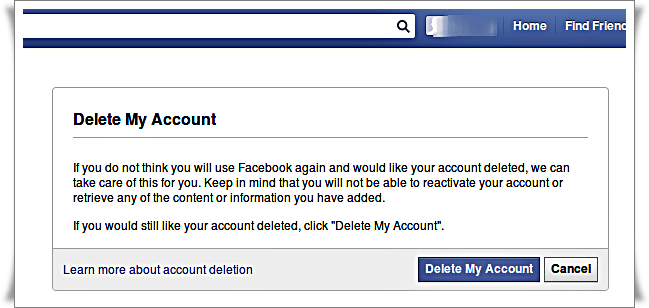
Frankly, I have not found this link on the Facebook site itself. Perhaps I have not looked for enough, but maybe they have hidden too. You will also have to go through new information of your password, then a validation by e-mail before being carried out!
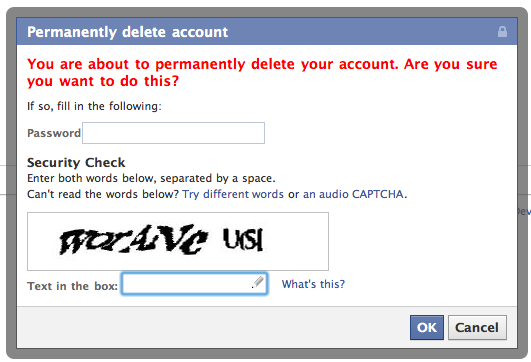
And still, it's not finish!
The account takes 15 days to be deleted, in case you change your mind! And to reactivate it, oddly, it's super easy: simply log in to your account, and the delete request is canceled.
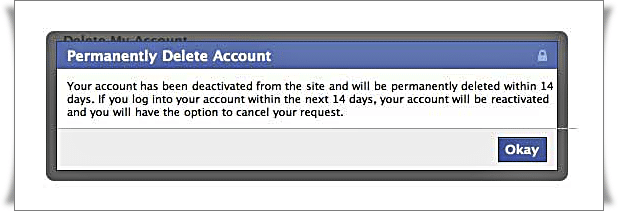
Anyway, personally I find it more than average, this story of simple deactivation. I am sure that many people who believe they have deleted their account still have all their photos online!.
Also Read: Trick ... How to change your Facebook Theme?
Subscribe to:
Posts (Atom)


