More than 2 million people have downloaded the updated version of the "CCleaner" program, which fights viruses on computers, according to software programmers.
According to some sources, the "CCleaner" programmers confirmed that the modern version of the program was manipulated before it issuance, causing great harm to everyone who downloaded.
According to the sources, 2.27 million users have uploaded the latest version of the program, have been hacked.
Paul Young, one of the company's representatives, said they were able to fix the bugs in the program once the virus was added to the modern version.
Your computer, your phone and all your devices are at risk of hacking and switching to botnet Without your knowledge. But fortunately there is an effective way to protect yourself and your privacy online.
Securely protect and lock any app with AppLock: from the makers of Keepsafe: app security software used by 50 million people.
Protect your apps, emails, messages and photos via our secure application lock with password or fingerprint app lock protection. You can even use App Lock for kid mode to protect your phone and prevent your kids from opening locked apps or deleting or purchasing anything while playing with your phone.
Features:
• Lock any app • Unlock apps with a PIN or Pattern • On supported devices, use your fingerprint to quickly and easily lock apps and unlock them again • Supports more than 10 languages • Beautiful Material design • Simple to use app locker with password featuring several lock options • App Lock can protect new apps proactively
Like the previous blocker, App Locker belongs to the simplest programs in its category. It also supports three variants of protection: a password, a fingerprint (if the device has a scanner) and unlock. you can choose the color scheme of the interface, if desired.
Features:
• Lock your apps with a "secure" but "easy to unlock" pattern.
• Now wirh fingerprint support!.
• The lightest AppLock on Google Play Store which does not consume RAM, battery and other system resources like others!
• Secure your messaging and social apps and make your social life really your's.
• Lock Facebook Messenger chat heads (bubbles).
• Hide your pictures by locking gallery and photo apps.
• Keep your data secure from prying eyes.
• Totally free - always free.
• Awesome Themes and Colors!
• Material designed.
• Works flawlessly even with latest versions of Android!
Hexlock is an app lock that will protect your privacy and secure your apps with up to six unique profiles to cover every situation. Set up a PIN password or a pattern lock and put your mind at ease whenever you share your mobile device. Protect your Gallery, SMS, Calls, Contacts, Gmail, Facebook, Whatsapp, Kik and more with this app protector. Keep your pictures safe with Hexlock's new Media Vault to hide photo and video files in a locked gallery vault only you can open. Hexlock is the best app locker for parental control and offers customized protection wherever you go.
Features:
✔ Lock Whatsapp, Emails and SMS. Keep your messaging safe! ✔ Secure Pictures and Videos in the Media Vault. Hide private files! ✔ Protect yourself from intruders. Lock your Games! ✔ Lock your Gallery and Photos. Keep your Privacy! ✔ Protect your Social Network apps. Secure your Kik and Facebook app! ✔ Lock your Systems. Control your own Wi-Fi, Settings, etc! ✔ TRACK SUSPICIOUS ACTIVITY See who tried to unlock your apps and photos in the Security Log
AppLock can lock Facebook, Whatsapp, Gallery, Messenger, Snapchat, Instagram, SMS, Contacts, Gmail, Settings, incoming calls and any app you choose. Prevent unauthorized access and guard privacy. Ensure security. AppLock can hide pictures and videos. Hidden pictures and videos are vanished from Gallery and only visible in the photo and video vault. Protect private memories easily. No pin, no way. AppLock has random keyboard and invisible pattern lock. No more worry people may peep the pin or pattern. More safe!
Vault is a mobile app designed to hide private pictures, videos, sms, call logs and contacts on your phone. Currently there are more than 100 million users worldwide using Vault to protect their mobile privacy while enjoying App Lock, Private Bookmark, Incognito Browser, Cloud Backup and many other helpful features for completely free! Join them now!
Features:
✔ Hide and Protect Photos & videos: Photos and videos imported into phone can only be viewed or played after the correct password is entered. These photos and videos can also be backed up to Cloud Space for better protection.
✔ Hide and Protect SMS: You can easily hide your SMS and read, back up or restore them anytime you want.
✔ Contacts/Call logs Protection: Set your contacts as private and all call logs and SMS with them will be hidden.
✔ App Lock (Privacy Protection): Use App Lock to protect your social, photo, call logs and telephone apps to prevent privacy leak.
✔ Private Browser: With Private browser, your internet surf will leave no traces behind. There is also Private Bookmark feature.
✔ Cloud Backup: Back up your SMS, contacts and call logs, photos and videos to Cloud so they never get lost.
✔ Data Transfer:With Cloud Backup feature, you can easily transfer your data to a new phone.
✔ Password recovery: Worried about forgetting your password? Set a security email in Vault so you can retrieve it.
Phishing is the method of stealing login info(usernames and passwords) by directing the victim to a clone(fake) login page, that logs the login info without the knowledge of the victim. Such clone website is known as a phisher.
Use your login info in the correct places only. Don't ever put your login info anywhere else than the page you registered to, unless it's a trusted service you know(such as youtube or blogger asking for your google account's info). Make sure the website you're logging in isn't fake.
Whenever you login to a website, if you didn't type the URL(address) of the website yourself, i.e. if you clicked a link that led you to the login page(from message, website, search engine results), always check the url(address) to see if you're in the right place. For instance, if you're logging in your facebook account, make sure the url appears as http://www.facebook.com/... Where a phisher page would look like http://www.facebook.freewebs.com/... or http://www.facebook.justfree.com/... or any url whose part before the .com isn't exactly the same as the page you want to login to.
Make sure the links you're clicking aren't fake. Whenever you're clicking a link, check where the link goes before clicking it. Links can be masked to appear as something else than the page they're leading to. For example, www.google.com leads to yahoo instead of google. Fortunately, in most browsers, whenever you point your mouse cursor over the link, the true location of the link is displayed on the bottom left part of the screen. Try it with the above link.
This is particularly important because it can protect you from another, rarer but more dangerous method called cookie stealing, which is basically automatically stealing your account if you're previously logged in the website.
Know that links to phishing pages are usually spread via email, and often represent impersonating trusted services and persons, such as making the email appear as it's sent from the website you've registered to, or a friend of yours whose account has been compromised.
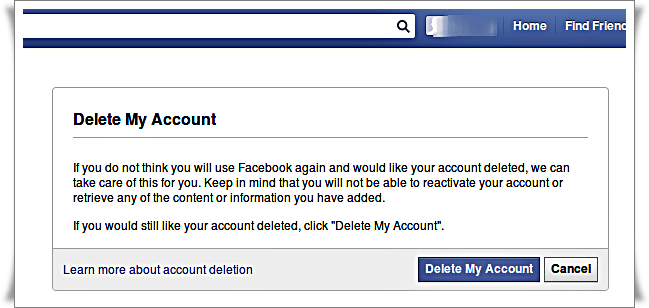
On Facebook, when you close your account, it is simply disabled, not deleted. You can reactivate it by simply logging on to the site. Here is the method to remove it permanently.
Disabling your account results in disabling your profile and removing your name, photo and anything you posted on Facebook.
Then there is nothing about deleting. And yes, I just tested, I turned off my account, but when I reconnected, everything was again there, fresh and dapper!. And as a bonus, we receive a small message that the servers of Facebook are happy to find us.
Deleting Permanently..
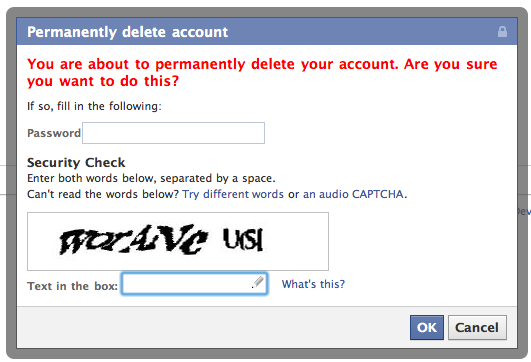
Fortunately, there is a solution to permanently remove your Facebook account. This is a well hidden page and requires many validations, using the following link: Delete My Account: https://ssl.facebook.com/help/contact.php?show_form=delete_account
Frankly, I have not found this link on the Facebook site itself. Perhaps I have not looked for enough, but maybe they have hidden too. You will also have to go through new information of your password, then a validation by e-mail before being carried out!
And still, it's not finish!
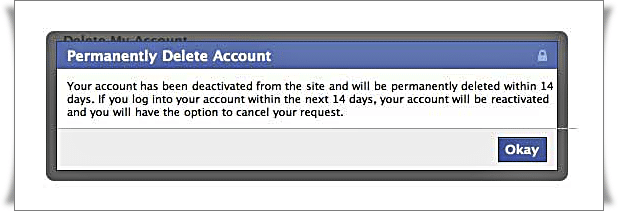
The account takes 15 days to be deleted, in case you change your mind! And to reactivate it, oddly, it's super easy: simply log in to your account, and the delete request is canceled.
But do not worry, if for reasons of confidentiality, the account being disabled, it is no longer available to the public.
Anyway, personally I find it more than average, this story of simple deactivation. I am sure that many people who believe they have deleted their account still have all their photos online!.
First of all let's us talking a little bit about what can do Keylogger softwares installed on your computer. Keyloggers can record your keystrokes, tracks your activity and can record also the open sites on your browser And everything can be done on your PC.
How To Record Everything That is Going On Your Computer Using Keylogger
1. First download Revealer Keylogger from its official website. There is a Free/Pro versions, Pro version contains several features like: Screen Capture, Full Invisible Mode and Remote Monitoring.
2. After downloading and installing the Revealer Keylogger software, it will appear like below. Click on Start to run it.
3. To Protect the software with password Go to Settings => security and put a mark on Protect The Interface With a Password. Click Ok then choose a Password.
4. When closing the software it will remain works and it will run automatically when windows run. To open software just press on CTRL+ALT+F9 from the keyboard.
5. When opening the software you will find all activity that happened on computer recorded in both time and place.
As we all know, With the widespread use of the Internet across all the world and unfortunately Trojans and Spyware also has been spreaded online terribly.
A Trojan is any malicious worm that is employed to hack into a pc by deceptive users of its true intent. A Trojan provides malicious users all control over the infected pc. they allow the hacker to try and do anything they want on the infected pc , as well as sending, receiving, launching, and deleting files, displaying information, and rebooting the pc and everything he wants.
So to protect ourselves, today we will give you one of the best programs that delete those malicious programs. Because most of antivirus programs can detect those programs, but cannot remove it from the root.
Loaris Trojan Remover help you remove all trojans and malware at its roots from your pc.
So first and foremost, download and install a Loaris Trojan Remover program on your machine.
Then the program asks you to create an account, you can skip this step.
After launching the program, it will begin searching for infected files and when it finds a file infected with the virus, you will receive a warning sound. After the scan is complete, you will notice a terrible amount of virus wre stored on your pc from where you do not know.
1. The program comes with wonderful user interface and attractive design. 2. The software will remove the malicious files at their roots. 3. The software can stop and delete files that are starting with opening Windows. 4. This Software provides you a high and distinctive security environment protect, not only on Windows but while you browse the Internet also. 5. with smallest size only 54 Mb. 6. You can benefit from the 30-day trial period.
Today, i will share you the best websites, that will serve you too much to protect yourself from spyware and malware, from files that you download from unknown sources.
All you have to do is to visit any of these websites, And then process to scan the file which you have downloaded online. These websites rely in scanning files process, on the most popular security software including Kaspersky, Avast,Panda and many other security software.
Jotti's malware scan is a free service that lets you scan suspicious files with several anti-virus programs. You can submit up to 5 files at the same time. There is a 50MB limit per file. Please be aware that no security solution offers 100% protection, not even when it uses several anti-virus engines. All files are shared with anti-virus companies so detection accuracy of their anti-virus products can be improved.
VirusTotal, a subsidiary of Google, is a free online service that analyzes files and URLs enabling the identification of viruses, worms, trojans and other kinds of malicious content detected by antivirus engines and website scanners. At the same time, it may be used as a means to detect false positives, i.e. innocuous resources detected as malicious by one or more scanners. 3. VirSCAN
Virscan is a FREE on-line scan service, which checks uploaded files for malware, using antivirus engines, indicated in the VirSCAN list. On uploading files you want to be checked, you can see the result of scanning and how dangerous and harmful/harmless for your computer those files are.
The Metadefender Product Family is a robust security platform for IT admins, independent software vendors (ISVs) and malware researchers that offers unmatched protection & analysis of known and unknown threats. Metadefender's product offering consists of 6 products that allow you to implement security improvements strategically, exactly where and when you need them.
Everyone knows that once you are on malicious or fraudulent websites, your PC can easily become infected, especially if your computer or mobile device does not have anti-virus software installed. But could this be avoided? Yes, and it’s as simple as this: if a website looks suspicious, you check it on Drweb Online before clicking on the unknown link.
If you are interested in penetration testing and ethical hacking, Then undoubtedly that you are in need of high-quality educational resources, That can guides you to a professionalism, That's why I decided to do a search for a course, that respect your mind and improve your level, and I've actually found it.
This course, offered by cybrary.it website, entitled : Free Penetration Testing & Ethical Hacking.
After visiting the website, simply click on the link "Start Course", You will be asked to open an account in the website or login if you have one already.
If you are interested in security and hacking, you are now in the right place. Where I will share you a series of e-books that help you to raise your knowledge level in this field. For your information, these books are worth more than $ 50, but this offer is limited for you for free.
This offer is presented by The Hacker News website, which handles the Latest hacking news and security issues.
To take advantage of this limited offer, You just have to visit the offer page by clicking HERE.
After that enter your email address and click on Download button.
Now open your email to find a message like this form.
Now, just select the book which you want to download and then click on "Download".
After that you will pop up a new window, and the download process will start immediately.
One of the most embarrassing moments, is when your friend asks your phone, to begin accessing in your personal files,such as photos, multimedia and others. For this reason, i will suggest you an app that can solve for you problem like that.
This App called File Hide Expert, which is free and available on Google Play store, by more than one million downloads. This will allow you to hide your files with option to setting a password. To take advantage of this app, just download it and then launch it, and You will find its main interface as below:
Now, just click on the blue icon file, above. after that, Select the file you want to hide,then activate the hide option.
To make a password for your app, Go to Settings, And then activate Enable Password option, then enter your password.
If you want to retrieve your files stored to their Basic mode, just press on "Hide All".
I can see you hiding in the shadows over there and so can the logs of all the web sites, FTP servers and other nooks and crannies you visit on the web. The sort of information gathered by these logs and which is available to the webmasters of the sites you visit include the address of the previous site you visited, your IP address, your computer's ID name, your physical location and the name of your ISP along with less personal details such as the operating system you're using and your screen resolution. If someone was snooping through your dustbin to gather information on consumer trends or tracking your every move to see where it is you go everyday you wouldn't be too chuffed would you. Well the web is no different, it's still an invasion of privacy and a threat to security and you don't have to put up with it.
Proxy servers:
Every time you visit a web site, detailed information about your system is automatically provided to the webmaster. This information can be used by hackers to exploit your computer or can be forwarded to the market research departments of consumer corporations who by tracking your activities on the internet are better equipped to direct more relevant spam at you. Your best defence against this is to use what is known as a proxy server, which will hide revealing information from the web sites you visit, allowing you to surf the web anonymously. These work by altering the way in which your browser retrieves web pages or connects to remote servers. With a proxy server set up, whenever you 'ask' IE or Netscape to look at a web page, the request is first sent through an external server which is completely independent of your ISP's servers. This third party server then does the requesting on your behalf so that it appears that the request came from them rather than you and your real IP address is never disclosed to the sites you visit. There is nothing to download and the whole process takes less than a minute.
There are two different ways to use proxy servers and both have their advantages and disadvantages. The first method is to use a web based service. What this involves is visiting the proxy's home page each time you want to browse a web site anonymously. The core component of such a system is the dialog box where you enter the address of the web site you want to visit. Each time you enter the URL of the site you want to browse via the proxy into this box, your personal information, IP address and so on is first encrypted before being sent to the site allowing you to maintain your anonymity. Two of the best examples of this type of web based proxy service are Code:
hxxp://www.rewebber.com/
and hxxp://www.anonymizer.com/.
Obviously one disadvantage of using a web based service like Rewebber or Anonymizer, however, is that you have to visit the proxies home page each time you want to surf anonymously. You could choose to select this page as your default home page, but it's still quite awkward if you're forever site hopping at the speed of light. The second main 'con' is that you often have to put up with extra adverts on the pages you visit. These are automatically inserted into the pages by the proxy - they have to pay for service somehow. More sophisticated and convenient solutions are also on offer yet they come with a price tag.
The second method you can use to protect your privacy via a proxy server involves adjusting the settings of your web browser so that you can surf anonymously without having to visit the home page of your proxy each time. To do this you will first need to know the name of your proxy server and the port number it uses. This information can be gleaned from either a public proxy server list or the FAQ referring to a private subscription based service. Once you have the name of the proxy server you wish to use, select 'Internet Options' from the 'Tools' menu of your browser. Now select 'Connections' followed by 'Settings' and tick the 'use a proxy server' check box. To finish the job all you have to do now is enter the name of the server in the 'address' box, the port which it uses in the 'port' box and go forth and surf anonymously.
Free, manual proxy servers as advertised on anonymity sites, if you can find one at all, are likely to be highly oversubscribed, and as a result the speed at which they retrieve web pages can deteriorate. In which case you can go in pursuit of a public proxy server list and select an alternative from it, which can then be set up manually. To locate such a list you can investigate sites such as Code:
hxxp://www.proxys4all.com/
however, this method isn't problem free either, so before you get too carried away and go jumping on the anonymity bandwagon there are a few things you should be aware of. It's very easy to use proxies to protect your privacy, but often the disadvantages of using them far out weigh the benefits. You see, the problem is that, like the proxy servers provided Rewebber et al, free, public proxies are nearly all over subscribed and so they can slow down web browsing considerably. Digging out fast reliable proxy servers is an art form in itself and is a skill which takes considerable practice. You could find a list of public proxy servers and then experiment with each one until you find one that runs at a reasonable speed, but this can be very time consuming and frustrating. Instead, your search would be much more efficient if you got a dedicated program to carry out this task for you. There are literally dozens of proxy seeking programs around which can do just that, and many of them are available as freeware. What these do is scan the internet for public proxy servers. These servers are then tested for speed and anonymity (not all of them are truly anonymous, even if they claim to be!) and once you find one which suits your requirements you can select it as your default proxy with the click of a button.
One of the most significant advantages of using an automated tool to locate proxy servers is that you do not have to keep editing your proxy settings manually each time you wish to try out a new one. Instead, what you do is enter 'localhost' or '127.0.0.1' into the 'address' box and '8088' into the 'port' box of your browser's proxy settings menu and then forget about it. All future proxy switching is then orchestrated from within your proxy seeking software, which subsequently relays the information to your browser or whatever type of application you are attempting to make anonymous. For those of you who are curious 'localhost' and the IP address '127.0.0.1' are the names by which every computer on the internet refers to itself.
Here's a good selection of links, which should help you to get started - Code:
hxxp://www.a4proxy.com/ Anonymity 4 Proxy
hxxp://www.helgasoft.com/hiproxy/ Hi Proxy
hxxp://www.proxy-verifier.com/ Proxy Verifier
hxxp://www.photono-software.de/ Stealther.
You may find that even when using these programs you have difficulty finding good proxy servers. It is for this reason that many people choose only to use proxy servers temporarily whilst doing something which may land them in trouble with their ISP, or in a worst case scenario with the law. The most obvious example of a situation in which you would want to cover your tracks is when scanning for public FTP servers and subsequently uploading to them. Most other net activities are unlikely to incur serious consequences so under these circumstances you can safely surf the web without a proxy. If you're really serious about protecting your privacy, however, your best bet is probably to invest in a dedicated, stable proxy such as the ones offered by Code:
hxxp://www.ultimate-anonymity.com/ Ultimate Anonymity
These aren't free, but may be worth the expense if you aren't keen on continuously switching proxy servers.
Before splashing out though it may be worth checking if your current ISP has a proxy server of its own which you can use. These aren't there to help you to commit cyber crimes and get away with it, they actually have a legitimate purpose as well - otherwise they wouldn't exist. You see, proxy servers were originally designed to help speed up web page loading times. Proxy servers contain a cache of all the web pages which have been requested via the browsers of the people using the proxy. When someone surfs the web using a proxy, the proxy first checks to see if it already has a copy of the web page stored in its cache. If this version of the page is bang up to date, it is sent to your computer and appears in your browser. If the page found in the cache of the proxy server is older than the one stored on the server hosting the page, a new request to the web server is made and the page is updated in the cache of the proxy before being sent to you. Because these servers use very fast internet connections they can retrieve web pages at much greater speeds than you can via your modest home setup. If these servers are located physically nearer to your home than the web host servers you wish to retrieve web pages from, the speed at which you browse the web will be accelerated.
Anonymity - Cookies
One last important point you need to be aware of before jumping in with both feet is that different programs have to be setup in different ways before being able to make external connections via a proxy server. For example, you can surf the web anonymously by modifying the settings in Internet Explorer or Netscape Navigator as explained earlier in this tutorial, but this will only affect your browser. If you then used Flash FXP to copy a batch of 0-day releases from one FTP server to another, this isn't going to protect you in the slightest. What you have to do is enter the name of the proxy server into each application you wish to make anonymous before making any external connections. This can usually be done by browsing through the preferences of your program to see if there is a 'use proxy server' option available. If there is, make sure you use it!
Cookies:
You have little to fear from the edible variety, but the digital ones can be a major threat to your security and privacy. A cookie is a tiny text file (usually less than 1kb in size), which is created and stored on your hard drive whenever you visit a dynamic (or an interactive if you like) web site. These are used to log your personal details so that you can access members only areas of web sites without having to type in a password every time, or to retain your customised settings so that they are available the next time you visit. If you're using a shared computer, anyone who visits the same site that you have previously logged in to can access your accounts. This is particularly worrying if you have entered your credit card details into a form on an e-commerce site. If your browser is set to automatically fill in these details whenever you
return to a previously visited site, this information could be clearly visible - you don't need me to explain the problems this could entail.
The solution to this problem is to delete any cookies which contain sensitive data once you have completed your transactions. Your cookies will be stored in a different place depending on which operating system you are using so you will have to use your detective skills to find them. As an example, in Windows XP they are located in your 'c:\Documents and Settings\Kylie Minogue\Cookies' directory (that is if your name is Kylie Minogue. Mine isn't in case you're wondering!). If you look in this directory, in some cases it is easy to identify which cookie is associated with which web site, but in other cases it's not so obvious. The cookie which was created when you visited Yahoo.com to check your email may be called kylie minogue@yahoo.txt for example. Unfortunately some cookies refer to the IP address of the site you visited and so look more like kylie minogue@145.147.25.21. These cookies can be selectively deleted one at a time if it's obvious which ones are causing a threat to your security, or you can just wipe out the whole lot in one fell swoop and have them recreated as and when they are required. However, if
you're really struggling to find your cookie jar, you could delete your cookies via your browser's tool bar instead. In Internet Explorer this can be done through the 'Tools' > 'Internet Options' menu items.
If all this sounds like too much hassle, you can always find a labour saving program which will be happy to take the job off your hands. These 'cookie crunching' programs allow you to be more selective when editing, viewing and deleting cookies from your system, and some of them will even prevent cookies from being created in the first place. Yes, I know you're hungry for links so I won't deprive you. Have a look here - Code:
hxxp://www.rbaworld.com/Programs/CookieCruncher/ Cookie
Cruncher
hxxp://www.thelimitsoft.com/ Cookie Crusher
hxxp://www.angove.com/ Cookie Killer
hxxp://www.kburra.com/ Cookie Pal
and
hxxp://www.cookiecentral.com/ Cookie Web Kit.